
Tipping on Delivery Apps: What the Fee Breakdown Really Means
Delivery app checkout screens are designed to confuse, and most people have no idea whether their tip is going to the driver, the restaurant, or both.
Why the Delivery App Total Is Not What You Think
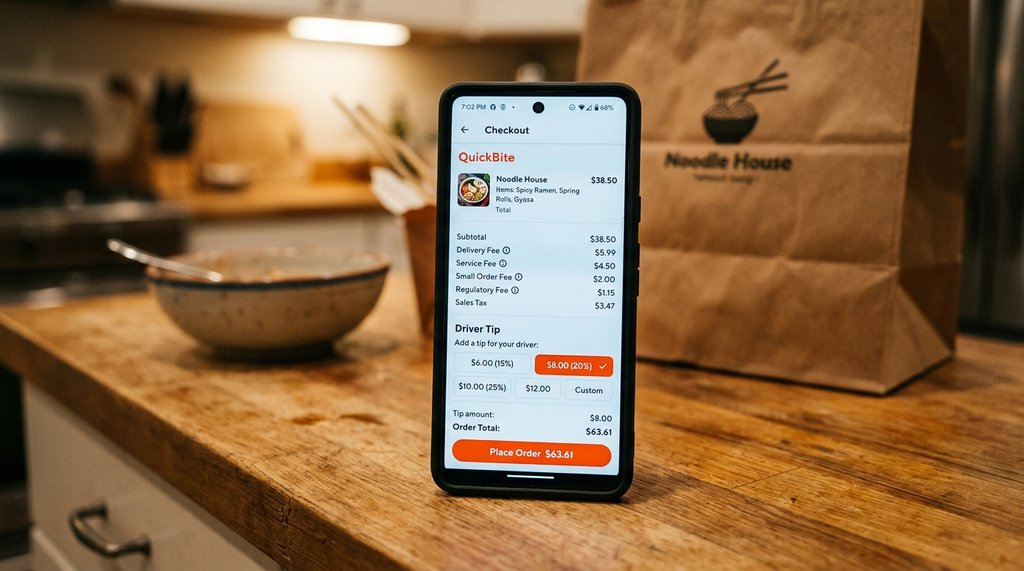
Open any major delivery app and you will find a checkout screen stacked with charges: subtotal, service fee, delivery fee, small order fee, and sometimes a regulatory fee tacked on for good measure. By the time you reach the tip prompt, the "total" shown can be 40 to 60 percent higher than the menu price of your food. That number is almost never what you should base your tip on.
A $18 burrito bowl can arrive at checkout showing a $29 pre-tip total once platform fees are added. If you tip 20 percent on that $29 figure, you are leaving $5.80, which sounds right. But you are partly tipping on fees the platform pockets, not on the cost of the food or the driver's effort. Most tipping etiquette advice was written for sit-down restaurants, where no platform fees exist, so it does not translate cleanly here.
Where the Driver's Cut Actually Comes From
Most major platforms base the driver's base pay on factors like distance, estimated time, and order complexity, not on the subtotal or the service fee. Your tip is added directly on top of that base pay and goes entirely to the driver in most cases, though platform policies do change, so it is worth a quick check of the app's current policy. The service fee, typically 10 to 15 percent of the food subtotal, goes to the platform. Try the tip calculator to see your own numbers.
This means the relevant number for your tip calculation is the food subtotal, not the inflated grand total. On a $25 food order, a 20 percent tip is $5. That is a reasonable amount for a driver who spent time driving, parking, and carrying your order. Tipping 20 percent on the $40 checkout total, on the other hand, means $8, which is generous but not what most people intend when they tap the default button without reading the breakdown.
The Default Tip Buttons Are Not Neutral
Delivery apps frequently set their default tip buttons to percentages of the full pre-tip total, including all fees. So when you see three buttons labeled 15%, 20%, and 25%, those percentages often apply to a number that already includes a service fee. Selecting 15% might actually result in a tip that looks like 22% of the food cost alone. Apps have every incentive to structure this to generate higher absolute tip amounts, since studies show higher tips improve driver retention on the platform.
A practical fix: before tapping any button, look for a custom tip field. Enter a dollar amount based on the food subtotal instead of a percentage of the total. For most standard orders under 30 minutes of travel, $4 to $6 is considered fair. For large orders, bad weather, or long distances, scaling that up to $8 or $10 reflects the actual effort involved. Using a dedicated tip calculator to run the math on the food-only subtotal takes ten seconds and gives you a clear, defensible number.
Bad Weather, Long Waits, and When to Adjust Up
Delivery tipping is not static. In summer heat waves or during heavy rain, drivers are dealing with significantly harder conditions than a clear Tuesday afternoon. Many experienced delivery customers apply a simple rule: if the conditions are visibly difficult or the driver had to wait at a restaurant, increase the flat dollar tip rather than sticking to a percentage formula.
Similarly, if your order arrives late due to restaurant delays rather than driver behavior, the tip should not drop. The driver often waited at the restaurant and had no control over the kitchen. Reviewing the order timeline in the app usually shows exactly when the driver picked up versus when they arrived. That context matters before you decide to adjust the default tip down. Running your adjusted amount through a quick tip calculation tool helps you check whether your instinct is calibrated to the food total or the inflated platform total.